



In 2026, process automation has shifted from a convenience to an operational necessity. For small businesses, the central platform decision comes down to choosing between the established cloud platform Make (Integromat) and the flexible open-source solution n8n.
When workflows scale, selecting the wrong tool can lead to inflated monthly software expenses or security risks. A technical review of both platforms across real-world business scenarios highlights their key differences and trade-offs.
1. Make (Integromat): Ideal Entry Point with Financial Bottlenecks
Make is the standard starting point for no-code specialists and marketers. Its main advantage is an intuitive visual drag-and-drop builder that simplifies workflow design.
Key Advantages of Make:
- Low Barrier to Entry: Connecting Facebook Lead Ads to a CRM and Telegram channel takes approximately 15 minutes.
- Extensive Module Library: Nearly all popular SaaS platforms offer pre-built connectors.
- Visual Debugger: Step-by-step data inspection inside each node makes troubleshooting fast and straightforward.
Key Limitations of Make:
- Pay-Per-Operation Pricing: When scenarios process large datasets (e.g., parsing 500 products or batching contacts), every single step consumes operations. At volumes over 100,000 operations per month, subscription fees scale significantly.
- Cloud Infrastructure Dependency: Workflows rely entirely on Make’s hosted servers. If service outages occur, internal business automations pause.
Make — Integration Lead Capture
Facebook Lead Ads to CRM and Telegram notification

Every module execution counts as a billable operation – 4 steps per lead x monthly lead volume = total ops.
Facebook Lead Ads trigger a Make scenario that routes each new lead through a filter, pushes it into the CRM, and fires a Telegram notification to the sales team — a typical 15-minute setup.
Make — Integration Scheme 2: Order Processing
E-commerce order sync to spreadsheet and team alert
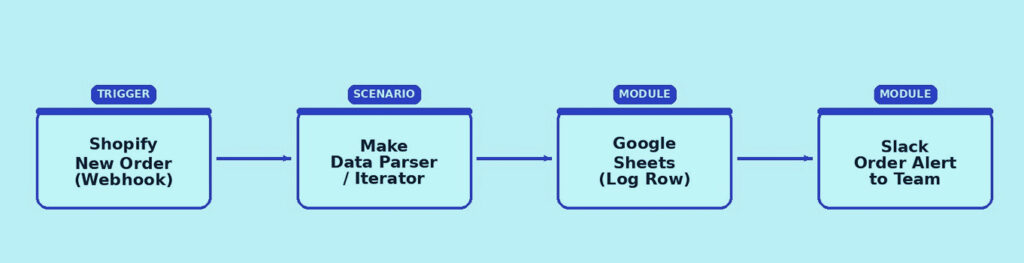
Batch operations (e.g., parsing 500 line items) multiply operation count fast – a key cost driver at scale.
A Shopify order webhook feeds a Make scenario that parses line items, logs each order to Google Sheets, and alerts the team on Slack. Because every parsed item counts as an operation, this scenario shows how batch-heavy workflows drive up billable usage.
2. n8n: Flexibility, AI Capabilities, and Complete Control
n8n has gained strong traction among developers and technical marketers due to its Fair-Code / Open-Source model. It can be deployed on a private virtual server (VPS) for roughly $10/month to execute unlimited automated workflows.
Key Advantages of n8n:
- Zero Per-Operation Fees (Self-Hosted): Costs are tied strictly to server resources rather than execution counts. Running workflows every few seconds incurs no extra fee.
- Native Code and AI Capabilities: Easily insert custom JavaScript/Python blocks, construct AI agents with persistent memory, and connect Vector DBs, OpenAI, Claude, or local LLMs.
- Data Security and GDPR Compliance: All customer data remains on private infrastructure without being processed through third-party clouds.
Key Considerations:
- Technical Overhead: Initial deployment, maintenance, and complex webhook setups require server administration skills or developer involvement.
n8n — Integration Scheme 1: AI Support Agent
AI support agent with memory and vector search

Runs on your own VPS: unlimited executions, no per-operation fee, full control of customer data.
A chat or webhook trigger feeds an n8n AI Agent node backed by an LLM, which queries a vector database for context and returns a response while updating conversational memory — all running on self-hosted infrastructure.
n8n — Integration Scheme 2: Scheduled Private Data Sync
Scheduled private data sync with custom code

High-frequency triggers cost nothing extra beyond server resources – ideal for GDPR-sensitive, high-volume flows.
A cron trigger runs every few minutes, executes a custom JS/Python code node, writes to a private Postgres database, and sends an email or Slack report — with no per-execution fee regardless of frequency.
3. Comparative Analysis for Small Businesses
| Feature / Parameter | Make (Integromat) | n8n (Self-Hosted / Cloud) |
|---|---|---|
| Deployment Type | Cloud-only (SaaS) | Self-Hosted (VPS) or Managed Cloud |
| Pricing Model | Per operation/task | Per server instance (Self-Hosted) or per execution (Cloud) |
| AI Workflows | Basic API modules | Native LangChain, RAG, and AI agent nodes |
| Technical Requirement | No-code (Beginner-friendly) | Low-code (Requires basic JSON/JS understanding) |
| Data Privacy | Vendor-managed cloud | 100% private on dedicated infrastructure |
| Scalability Cost | Costly at high volumes | Highly cost-effective for enterprise-scale workloads |
4. Platform Selection Verdict
Choose Make if: The organization lacks dedicated technical staff, needs to launch standard integrations (CRMs, lead forms, social platforms) quickly, and maintains total monthly volumes below 20,000 to 50,000 operations.
Choose n8n if: Operations involve high-volume data processing, custom AI agent architectures, strict data privacy requirements, or a requirement to eliminate recurring task-based software fees.
Ready to deploy n8n on your own private infrastructure? Read the technical setup guide:
Step-by-Step Guide: How to Deploy n8n on Your Own VPS with Docker